
How to Download Audacity Without MuseHub
Yes. You can download and install Audacity without installing MuseHub. Use the official Audacity download page, choose the package for Windows, macOS, or Linux, and keep MuseHub optional unless you specifically want its catalog or compatible plugin-management features.
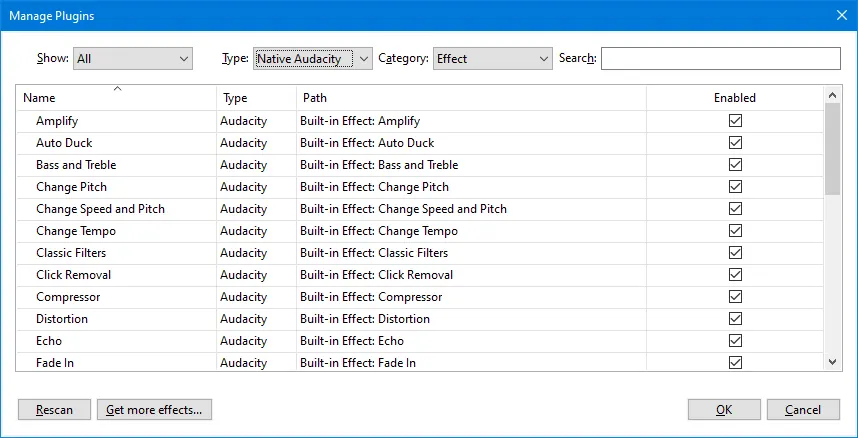
Open the official Audacity download page, choose your operating system, and install Audacity as a standalone app. The current release checked for this guide is Audacity 3.7.8. MuseHub is not required for recording, editing, exporting, or using Audacity's built-in effects.
Verified Audacity download facts
| Current release checked | Audacity 3.7.8 |
|---|---|
| Release date | June 11, 2026 |
| Windows package | 64-bit EXE; 20,400,664 bytes in official release metadata |
| macOS package | Universal DMG; 70,435,312 bytes in official release metadata |
| Linux package | x64 Ubuntu 20.04 AppImage; 124,369,400 bytes in official release metadata |
| MuseHub required | No for standalone Audacity |
| Download CTA | Official Audacity download page fallback; no unverified mirror or guessed CDN URL |
Can you download Audacity without MuseHub?
Yes. Audacity is a separate audio recorder and editor. MuseHub may list or manage related products, but it is not the only way to obtain Audacity and it is not required for ordinary editing.
For a safe download, start at Audacity's own download page rather than an advertising wrapper, an unofficial mirror, or a button that silently installs another manager. The page lets you choose the current Windows, macOS, or GNU/Linux route and keeps the publisher's release information in one place.
The phrase download Audacity without MuseHub can describe two different decisions: downloading the standalone editor, or avoiding MuseHub while still using a separate plugin. This guide covers the first decision, then explains the plugin boundary so you do not expect every MuseHub product to appear in Audacity.
- Choose Audacity from the official Audacity download page.
- Install the package for the operating system and CPU architecture shown on that page.
- Keep MuseHub optional unless you need a specific catalog product or manager workflow.
- Do not treat a third-party mirror or a repackaged installer as the official download.
What is the current Audacity version?
The official Audacity homepage and the Audacity GitHub release record checked on August 22, 2026 identify Audacity 3.7.8 as the current release used in this guide. The release was published on June 11, 2026.
The file sizes in the facts table come from the first-party release metadata for the Windows x64 EXE, macOS Universal DMG, and Linux x64 AppImage. A direct binary request from this validation environment was reset or timed out, so this site does not publish guessed CDN URLs. Use the official download page CTA to select the current file at the time you install.
| Platform | What to choose | Practical note |
|---|---|---|
| Windows | 64-bit EXE when your PC supports it | The official page also explains other Windows options. |
| macOS | Universal DMG | Use the package that matches your Mac and follow the publisher's current instructions. |
| GNU/Linux | x64 AppImage or the current Linux option | Check the current distribution and architecture notes before running it. |
| MuseHub | Not needed for standalone Audacity | Install it only for a separate MuseHub catalog or management need. |
Download and install Audacity on Windows without MuseHub
Open the official Audacity download page and choose the Windows download that matches your system. For a normal modern Windows PC, the 64-bit installer is the relevant starting point; if your device uses a different architecture, follow the official page's compatibility notes instead of guessing.
After the installer finishes, launch Audacity from the Start menu. You can record, import audio, edit tracks, use built-in effects, and export projects without opening MuseHub. If Windows shows a security prompt, confirm that the file came from the official Audacity route before continuing.
If you already have MuseHub installed, leaving it on the computer does not make Audacity more official or more functional. The two applications can coexist, but the standalone Audacity installation remains the host application for your audio work.
- 1Open the publisher page
Use the official Audacity download page and select Windows. Do not use a search ad that changes the destination.
- 2Run the correct installer
Choose the package that matches your Windows architecture, then keep the default install location unless you have a specific reason to change it.
- 3Test a basic project
Open Audacity, record or import a short clip, apply a built-in effect, and export a test file before adding optional plugins.
Download and install Audacity on macOS without MuseHub
On the official Audacity download page, choose macOS and use the package that matches the current publisher instructions for your Mac. The Audacity 3.7.8 release metadata lists a Universal DMG, so the same release can cover the supported Intel and Apple silicon workflow described by the publisher.
Open the DMG, move Audacity to Applications when the installer asks, and launch it from that folder. macOS may request permission for the microphone, files, or other resources; grant only the permissions needed for the recording or editing task you intend to perform.
MuseHub is not a prerequisite for this process. If your goal is only to record, edit, mix, or export audio, keep the installation path simple and use the standalone Audacity app.
- Use the official macOS download route, not a repacked DMG.
- Move the app to Applications so updates and permissions behave predictably.
- Open a small project first and confirm microphone or file permissions when prompted.
- Install a separate plugin only after the base Audacity installation works.
Download Audacity on Linux without MuseHub
Linux users should choose the current Linux option on the official Audacity download page and confirm the architecture before downloading. The 3.7.8 release metadata includes an x64 AppImage for Ubuntu 20.04, but the publisher's page remains the correct place to check whether a newer package, distribution note, or architecture option applies to your machine.
An AppImage normally needs executable permission before it can run. Follow the official instructions for your desktop environment, test Audacity with a short audio file, and keep the downloaded file in a location you can identify later. Do not confuse an Audacity AppImage with MuseSounds Manager for Linux: they serve different products.
The separate MuseSounds Manager Linux guide is for managing MuseSounds content. It is not required to download or run the standalone Audacity editor.
- 1Check the Linux option
Read the current architecture and distribution notes on Audacity's official page before downloading.
- 2Allow the package to run
Apply the executable permission method recommended for your desktop environment, then launch the AppImage from a trusted local path.
- 3Separate the product roles
Use Audacity for recording and editing; use MuseSounds Manager only when you need the Linux MuseSounds workflow.
What changes when you skip MuseHub?
Skipping MuseHub does not remove Audacity's core editor. You can still record, edit, apply built-in effects, save projects, and export audio. What you do not get is the convenience of a separate catalog and manager for products that MuseHub distributes or updates.
That distinction matters when a search result mixes Audacity, MuseScore Studio, MuseSounds, plugins, and MuseHub. Audacity is the host for audio editing. MuseSounds are designed for MuseScore Studio playback. A MuseHub catalog item may require its own account, license, supported plugin format, or update route.
If you are unsure which application you need, read what MuseHub does for Audacity before installing an additional manager. If you already use a compatible effect, the MuseHub plugin setup guide explains the separate rescan workflow.
Plugins, updates, and safe download choices
Audacity can use compatible plugin formats, but a product appearing in MuseHub does not automatically mean it is an Audacity plugin. Check whether the product supplies VST3, Audio Unit, or another format supported by your Audacity build and operating system. MuseSounds should not be treated as a general-purpose Audacity instrument.
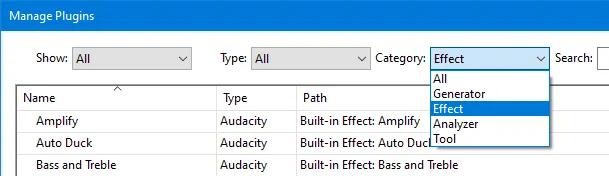
Install the base editor first, then add one optional plugin at a time. Restart Audacity and use Plugin Manager to rescan or enable the effect when the product's instructions require it. This makes it easier to tell whether a missing effect is a format problem, a scan problem, a license problem, or an unrelated installation issue.
For future updates, return to the official Audacity download page or the publisher's release record. If a direct file link cannot be verified as stable, use the official page rather than a mirror with a countdown, an old version label, or an opaque downloader. The same rule applies to MuseHub: the MuseHub troubleshooting guide keeps its manager checks separate from Audacity's standalone update path.
| Question | Safe interpretation |
|---|---|
| Do I need MuseHub for Audacity? | No for the standalone editor. |
| Will every MuseHub plugin work in Audacity? | No. Format, architecture, host support, and license must match. |
| Can MuseSounds appear as Audacity effects? | Not normally. MuseSounds are intended for MuseScore Studio playback. |
| Where should I get an update? | Use the current official Audacity page or first-party release record. |
| Can this site host the installer? | No. This site links to the publisher and does not repackage binaries. |
Download Audacity Without MuseHub FAQ
Can I download Audacity without MuseHub?
Yes. Download Audacity from the official Audacity page and install the Windows, macOS, or Linux package for your system. MuseHub is optional for standalone Audacity.
What is the current Audacity version?
The official release checked for this guide is Audacity 3.7.8, published on June 11, 2026. Recheck the publisher page before installing because versions can change.
Do I need a MuseHub account to download Audacity?
No for the standalone Audacity download route. A separate MuseHub catalog product may have different account or license requirements.
Can I use Audacity without installing MuseHub?
Yes. Recording, editing, built-in effects, project saving, and export work in the standalone Audacity application.
Will MuseHub plugins work in Audacity?
Only when the plugin format, CPU architecture, operating system, Audacity build, and license are compatible. Install the plugin separately and rescan it in Audacity when required.
Can I use MuseSounds in Audacity?
MuseSounds are designed for MuseScore Studio playback, not as general-purpose Audacity instruments. Use the MuseScore or MuseSounds Manager guide for that workflow.
Is there a direct Audacity installer link here?
The CTA links to the official Audacity download page. This environment could not reliably revalidate the GitHub binary Range response, so the page does not publish a guessed or potentially temporary file URL.
What should I do if Audacity does not open after installation?
Confirm that the package matches your operating system, launch the installed app from its normal location, review the publisher's support instructions, and test the base app before adding plugins or MuseHub-managed products.
Official sources checked
Version, platform, installation, plugin, and screenshot details were checked against first-party Audacity pages and release metadata on August 22, 2026. The screenshots are credited to the Audacity Manual under CC BY 3.0.
- Audacity official homepage - Current product identity and the distinction between Audacity and MuseHub.
- Audacity official download page - Windows, macOS, and GNU/Linux download routes; used as the stable CTA fallback.
- Audacity 3.7.8 official release - Release date, package names, file sizes, and first-party asset metadata.
- Audacity downloading and installing support - Publisher installation guidance and platform expectations.
- Audacity Manual: Manage effects, generators, and analyzers - Plugin Manager screenshots and rescan context; images credited CC BY 3.0.
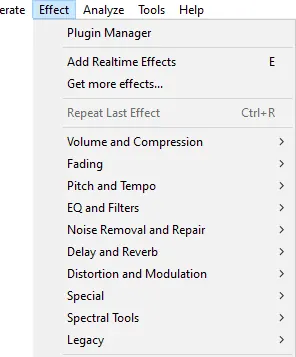
- Audacity Manual: Effect menu - Effect menu screenshot and standalone plugin entry points; image credited CC BY 3.0.